
Pop-Up Socket for Kitchen Island: The Complete Buying & Installation Guide

The kitchen island has become the most specified piece of furniture in the UK residential market. It is where breakfast happens, where children do homework, where guests gather while the host cooks, and increasingly where a laptop opens during the working-from-home hours that have become a permanent feature of domestic life.
All of that activity requires power. Yet the kitchen island is, by its nature, isolated from walls — the natural home of electrical infrastructure in a kitchen. Getting power to an island, and integrating it cleanly, is one of the more consequential decisions in kitchen furniture design.
At Moonian, we supply pop-up sockets for kitchen islands to furniture manufacturers and fit-out contractors across the UK, Germany, and the Netherlands. This guide covers both sides of the decision: what to buy, and how to install it correctly.

Why Kitchen Islands Are Different from Worktops
A kitchen island socket installation differs from a standard worktop installation in three important ways that affect both product selection and installation method.
Cable routing is more complex. A worktop socket draws its supply cable through the back of a cabinet to a wall-mounted consumer unit connection. An island has no wall. The supply cable must run through the floor — either through a conduit set into the screed during construction, or through a purpose-made floor box — and up through the island structure. This routing decision is made at build stage, not at fit-out stage, which is why specifying the socket early matters.
The island surface sees more varied use. A kitchen worktop near the hob is primarily a food preparation surface. A kitchen island is simultaneously a prep surface, a dining surface, a homework station, and a charging location. The socket specification needs to serve all of these uses — which typically means more USB-C capacity than a standard worktop socket.
Aesthetics are higher stakes. A kitchen island is the visual centrepiece of the room. A socket that looks like an afterthought undermines an otherwise well-executed design. Panel finish, flush profile, and overall unit quality are more visible on an island than anywhere else in the kitchen.
Choosing the Right Pop-Up Socket for a Kitchen Island
Mechanism Type
Two manual mechanism types are appropriate for kitchen island applications:
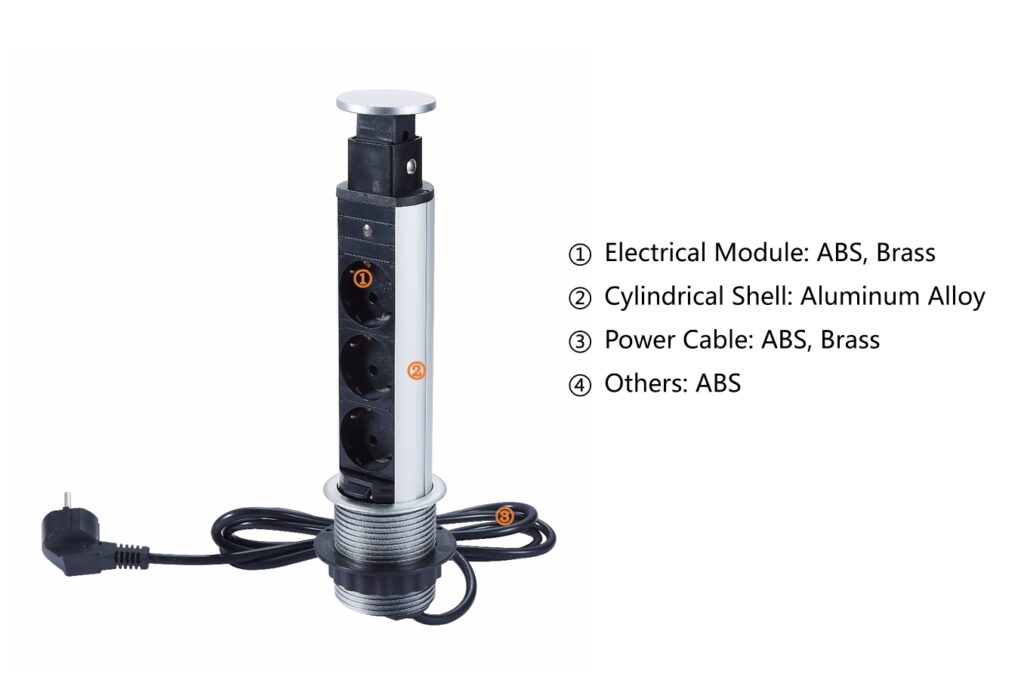
Pop-Up Desktop Socket — spring-loaded, press to open and close. When closed, completely flush with the island surface. No recessed edges, no visible hardware. The cleanest possible closed profile, which is why it is the most specified type for premium kitchen islands.
Pull Pop-Up Socket — manual pull with dual-lock mechanism. Preferred for island surfaces used by children, or for prep areas where accidental activation by a cloth or wrist is a concern. The recessed pull grip requires deliberate action to activate — it cannot be opened accidentally.
For most kitchen island applications, the pop-up desktop socket is the correct choice. The pull mechanism is worth considering when the island serves a family with young children, or when the surface will be used for heavy food preparation where accidental activation could be a safety concern.
Panel Material
For kitchen island installations, aluminium alloy panels are the standard specification. The reasons are the same as for any kitchen application — resistance to cleaning chemicals, maintenance of finish quality over a commercial-equivalent lifespan — but the visibility argument is stronger on an island.
An aluminium panel in brushed silver, matte black, or champagne gold reads as a considered design choice. A zinc alloy panel that begins to show surface wear at 18 months on the centrepiece of a kitchen is a warranty claim and a reputational problem.
Full material comparison: Aluminium vs Zinc Alloy Guide.
Outlet Configuration
The kitchen island in 2026 needs to serve multiple simultaneous use cases. The outlet configuration should reflect this:
For residential kitchen islands: 2 AC outlets + USB-C PD 65W is the practical minimum. For islands that regularly serve as home office workstations, specify USB-C PD 100W.
For hospitality and commercial kitchen islands (hotel breakfast bars, restaurant prep islands): 3 AC outlets + USB-C PD 100W. Higher cycle life rating — specify 50,000 cycles minimum.
For kitchen showroom display islands: Aesthetics take priority. Specify the cleanest panel finish in the most prominent colourway, with USB-C PD at whatever wattage the showroom’s target customer demographic would expect.
Full USB-C specification guide: USB-C Power Delivery Guide.
IP Rating
For most kitchen island positions — more than 300mm from the sink — IP20 (standard) is the correct and compliant specification. If the island design places the socket within 300mm of the sink, IP44 splash-resistant variants are required under BS 7671.
Check the zone classification before specifying. For full guidance on kitchen zones and IP requirements, see Pop-Up Electrical Sockets for Kitchens.
Installation: What Furniture Manufacturers Need to Know
The Floor Supply Decision
The most important installation decision for a kitchen island socket is made before the island is built: how does the supply cable get from the consumer unit to the island?
Option 1 — Floor conduit (preferred): A conduit is set into the floor screed during construction or renovation, running from the consumer unit location to the island position. The supply cable runs through this conduit. This is the cleanest solution and the one to specify whenever new construction or a full kitchen renovation allows it.
Option 2 — Floor box: A flush floor box is installed in the floor at the island position, connected to a supply cable run under the floor. The island sits over the floor box, with the cable entering through the base of the island structure. This approach works well in timber floor applications where underfloor cable runs are accessible.
Option 3 — Surface conduit: Where neither floor option is available, a surface-mounted conduit runs from the nearest wall to the island base. This is the retrofit solution — less aesthetically ideal but functional and compliant when correctly installed.
Pro Tip: Furniture manufacturers who supply kitchen islands as flat-pack or semi-assembled units should include a pre-drilled cable entry point in the island base, with a cable management clip inside the structure. This small detail makes a significant difference to the installer’s experience — and to the likelihood of a repeat order.
Cutout Dimensions
Standard Moonian pop-up socket cutout requirements:
| Model | Cutout Diameter | Panel Thickness Range | Body Depth Required |
|---|---|---|---|
| Pop-Up Desktop Socket (standard) | 60mm | 35–50mm | 85mm below surface |
| Pop-Up Desktop Socket (slim) | 60mm | 20–35mm | 65mm below surface |
| Pull Pop-Up Socket | 60mm | 30–55mm | 90mm below surface |
For kitchen islands with composite stone or thick hardwood worktops, confirm the panel thickness before ordering. Custom configurations for non-standard panel thicknesses are available on request.
Cable Length and Routing Inside the Island Structure
The supply cable enters the island base and runs internally to the socket position. Standard cable tail on Moonian units is 1.5 metres. For tall island structures or units where the cable entry point is distant from the socket position, specify extended cable tails at the order stage — retrofitting cable extensions inside a finished island structure is difficult.
Number of Sockets per Island
The question of how many sockets to install on a kitchen island depends on island length and intended use:
- Islands up to 1.2m: One socket unit, positioned towards one end of the island (typically the end opposite the hob side).
- Islands 1.2–2.0m: Two socket units, positioned at each end or symmetrically spaced.
- Islands over 2.0m or with seating on multiple sides: Consider a power track system running along the island centre, with adapters positioned to serve each seating position.
OEM Finish Matching for Kitchen Island Projects
Kitchen island furniture is frequently specified as part of a complete kitchen package where hardware finishes — handles, taps, appliance trim — are coordinated across the room. A pop-up socket in a mismatched finish undermines that coordination.
Moonian’s OEM colour matching service allows furniture manufacturers to specify panel finishes that match their hardware programme. Brushed gold, satin nickel, anthracite, and RAL powder coat colours are available on OEM orders from 500 units per SKU.
Lead time for custom colour samples: 20–25 working days from order confirmation. Full OEM process: OEM Customisation Guide.
Common Installation Errors to Avoid
Cutting the island worktop before confirming socket dimensions. Always obtain the installation drawing from your socket supplier before the worktop goes to the CNC operator. A 60mm hole cut to 65mm cannot be uncut.
Specifying insufficient body depth clearance. The socket body extends below the worktop surface. If internal island structures — drawer runners, shelf brackets, cable trays — are positioned directly below the socket cutout, the socket cannot be installed correctly. Allow minimum 90mm clear depth below the cutout.
Installing without testing the cable run first. Before the island worktop is fixed, pull the supply cable through the island structure and confirm it reaches the socket position with sufficient length. This takes five minutes. Discovering a cable length problem after the worktop is glued down takes considerably longer to resolve.
Not registering the installation with building control. In the UK, kitchen electrical work is notifiable under Part P of the Building Regulations. This applies to the island socket installation, not to the furniture manufacturer — but informing your customers of this requirement is good practice and protects you from liability questions later.
Request a Sample
Moonian ships kitchen island socket samples to UK and European addresses within 15–20 working days. Sample packs for kitchen island applications include:
- 1× Pop-Up Desktop Socket (aluminium panel, UK plug + USB-C PD 65W)
- 1× Pull Pop-Up Socket (aluminium panel, UK plug + USB-C PD 65W)
- Installation drawing with cutout dimensions and body depth requirements
- CE and UKCA certification documentation
Contact Wenyue to request a sample kit: WhatsApp: +86 15017527810 Email: wenyue@moonianhub.com
Or submit a project enquiry — we respond within 10 hours on working days.
Summary
A pop-up socket for a kitchen island requires more careful specification than a standard worktop installation — the cable routing is more complex, the usage demands are higher, and the aesthetic stakes are greater. The key decisions are mechanism type (press vs pull), panel material (aluminium for kitchen environments), outlet configuration (USB-C PD 65W minimum), and installation planning (floor supply route, cutout dimensions, cable length).
Both Moonian pop-up socket types are available CE and UKCA certified, with aluminium panels and USB-C PD up to 100W. OEM colour matching is available for projects requiring finish coordination with kitchen hardware.
Moonian Technology Media Limited is a B2B manufacturer based in Guangdong, China. We supply kitchen furniture manufacturers, fit-out contractors, and wholesale distributors across Europe and the Middle East. Factory: Gaoyao District, Zhaoqing, Guangdong. Production capacity: 4,000 units/day.