
Conference Room Power Solutions: What Furniture Manufacturers Need to Know

The conference room is one of the most demanding environments for integrated desk power. It hosts multiple users simultaneously, each arriving with different devices and different charging needs. It is reconfigured for different meeting formats — boardroom, workshop, presentation, video call — often several times a day. And it is one of the most visible spaces in any office, where the quality of the furniture makes an immediate impression on clients and senior stakeholders.
For furniture manufacturers, getting conference room power right is both a significant opportunity and a common point of failure. This guide covers everything you need to know to specify, design, and deliver conference room furniture that meets the demands of today’s meeting environments.
Why Conference Rooms Have Unique Power Requirements
Conference rooms differ from individual workstations in three important ways that directly affect power specification.
Multiple simultaneous users. A 12-person conference table needs power accessible to all 12 seats, not just the person at the head of the table. If power is only available at two or three fixed points, users at other seats resort to long extension leads — which immediately defeats the purpose of integrated power and creates the cable chaos the specification was meant to avoid.
Device diversity. Individual workstations can be configured for a known user with known devices. A conference room serves every employee in the company, plus external visitors. The power solution must accommodate laptops from multiple manufacturers, tablets, phones, video conferencing equipment, and presentation devices — across EU, UK, and potentially US plug standards.
Visibility and perception. The conference room is where clients are hosted, where board presentations happen, where the company makes its first impression. A poorly integrated power solution — sockets at inconvenient positions, visible cables, mechanisms that stick or wobble — reflects on the furniture brand and on the company that specified it. The tolerance for quality failure is lower here than almost anywhere else in the building.
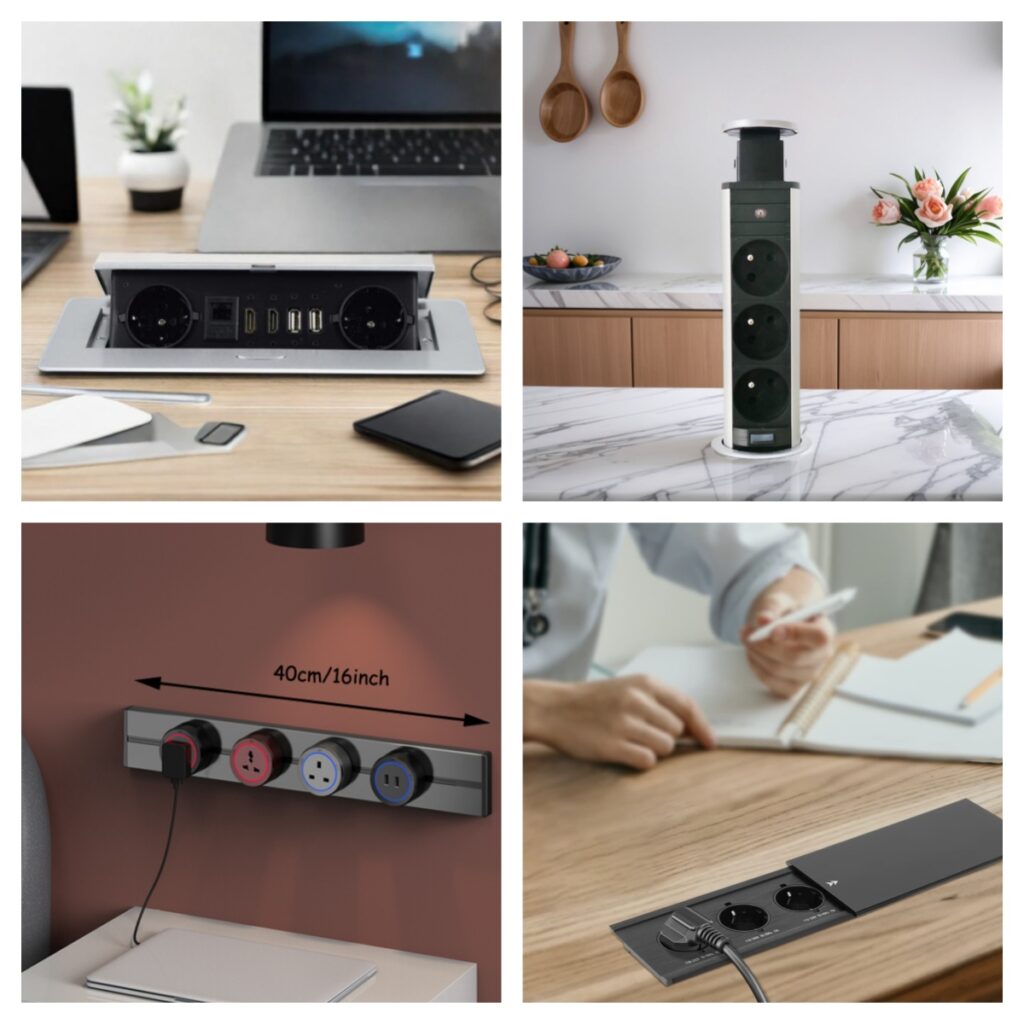
The Four Power Solutions for Conference Room Furniture
1. Pop-Up Sockets: The Standard for Fixed Conference Tables
For conference tables where seating positions are relatively fixed, pop-up desktop sockets distributed at regular intervals along the table length are the most widely specified solution.
Why they work in conference rooms:
- Completely flush with the table surface when closed — maintaining the clean appearance expected in a premium meeting environment
- Available with mixed outlet configurations: EU + UK + USB-C PD in a single unit, covering the full range of devices a meeting attendee might bring
- Pneumatic or electric mechanisms operate silently — important in video-conferenced meetings where background noise is a quality issue
- Commercial-grade models tested to 30,000–50,000 cycles handle the daily activation frequency of a heavily used meeting room
Placement guidance: For a rectangular conference table, one pop-up socket per two seats is the standard specification. A 12-seat table typically requires 6 sockets distributed evenly along both sides. Position each socket 30–40cm from the edge closest to the seating position to ensure comfortable reach without cable tension.
For a detailed look at socket types and their specifications, see our desktop socket types and features guide.
2. Power Track Systems: The Solution for Flexible Conference Rooms
For conference rooms that regularly reconfigure — combining into one large room, splitting into breakout spaces, or rearranging for workshop formats — a power track socket system offers flexibility that fixed pop-up sockets cannot match.
Why they work in conference rooms:
- Outlets slide to any position along the rail, accommodating different table configurations without any reinstallation
- Additional socket modules can be added as the room’s capacity changes
- Track systems can be specified at multiple positions along the table, with modules moved to concentrate power where it is needed for a particular meeting format
- Available with USB-C PD modules for laptop charging alongside standard AC outlets
Best applications:
- Large conference rooms that regularly host workshops or training sessions with varying layouts
- Modular furniture systems where tables join together in different configurations
- Co-working and collaborative spaces where conference tables double as project work areas
3. Pull Pop-Up Sockets: Enhanced Accessibility for Large Tables
For very wide conference tables — boardroom tables over 1.2m in width — standard pop-up sockets positioned in the center of the table may be difficult for users on either side to reach comfortably. Pull pop-up sockets solve this with a two-stage mechanism: the unit rises first, then extends outward toward the user.
Why they work in conference rooms:
- The pull-out extension brings the socket within comfortable reach regardless of table width or user position
- Some models rotate up to 360°, allowing the socket to face the user on either side of the table
- Built-in cable management channels keep cables organized during use, preventing visual clutter across the table surface
- The two-stage mechanism adds a tactile quality that communicates premium engineering to clients and visitors
4. Sliding Cover Sockets: For Credenza and Side Furniture
Conference rooms typically include more than just the main table — credenzas, side tables, and presentation surfaces also benefit from integrated power. For these secondary furniture pieces, sliding cover sockets provide a low-profile solution.
Why they work in conference room side furniture:
- Ultra-low profile when closed — barely visible in a credenza or side table surface
- Silent horizontal operation is appropriate for quiet meeting environments
- Excellent dust protection when closed — important for furniture that may go days without use between meetings
- Clean aesthetic complements the premium finishes typically used in conference room cabinetry
Technical Specifications for Conference Room Power
Getting the technical specification right is as important as choosing the correct product type.
USB-C Power Delivery wattage
The most commonly under-specified parameter. A USB-C port delivering only 15W or 20W will not charge a laptop. For conference room applications, the minimum specification is 65W per USB-C port, which covers most ultrabooks. For rooms where high-performance laptops are commonly used, 100W is the correct specification.
For a full explanation of USB-C PD wattage and why it matters, see our USB-C Power Delivery guide.
International outlet compatibility
Conference rooms in international businesses regularly host visitors from different countries. A mixed outlet configuration — EU + UK in one unit, or a universal outlet — prevents the situation of a client needing an adapter mid-meeting. For Middle Eastern markets, confirm compatibility with the local plug standard of the specific country.
Safety certifications
CE and RoHS certification is non-negotiable for conference room furniture sold into the EU market. For UK sales, UKCA certification is additionally required. These should be factory-issued and traceable to the specific product model.
For guidance on verifying supplier certifications, see our 5-factor supplier evaluation checklist.
Mechanism cycle life
A conference room table used five days a week, three meetings per day, with two socket activations per meeting accumulates approximately 1,500 activations per year. Over a 10-year furniture lifecycle, that is 15,000 cycles. Specifying a mechanism rated to 30,000 cycles provides a comfortable safety margin. Mechanisms rated only to 10,000 cycles — acceptable for residential use — will fail within the furniture’s expected commercial lifespan.
For more on commercial durability requirements, see our durable sockets for commercial furniture guide.
Common Mistakes in Conference Room Power Specification
Insufficient socket density. One socket per four seats sounds like enough until everyone arrives with a laptop and a phone. One socket per two seats is the minimum for modern conference rooms. For boardrooms where long meetings are common, one per seat should be considered.
Ignoring the head-of-table position. The presenter or chair typically has the most demanding power needs but is often furthest from the nearest socket. Always confirm that head positions are well served before finalizing the layout.
Specifying residential-grade mechanisms. A socket rated for 10,000 cycles is adequate for a home office desk used once or twice daily. In a heavily used conference room, the same mechanism will fail within three to five years.
No data ports. USB-C and AC outlets address charging, but modern conference rooms also need HDMI for screen sharing and Ethernet for reliable video conferencing. Specifying sockets that include these data ports eliminates separate AV cables cluttering the table.
Afterthought integration. Power added to a conference table design after the structure is finalized often results in awkward cutout positions and insufficient cable routing space. Power should be planned into the table design from the first sketch. For more on this, see our guide to avoiding the #1 power integration mistake.
OEM Considerations for Conference Room Furniture
Conference tables are among the highest-value pieces in any office fit-out, and the power module is one of the most visible components on the table surface. For furniture brands competing at the premium end, a generic catalog socket is a missed opportunity.
Custom OEM pop-up sockets can be specified with finish matching, logo integration, custom port configurations, and custom cutout dimensions. For more on what OEM customization involves, see our OEM customization guide.
A Specification Checklist for Conference Room Power
Before finalizing a conference room furniture specification, confirm:
- Socket density: minimum 1 per 2 seats, confirmed for all positions including head of table
- USB-C PD wattage: 65W minimum, 100W for premium applications
- Outlet standards: EU + UK mixed configuration for international use
- Data ports: HDMI and Ethernet where AV integration is required
- Mechanism cycle rating: 30,000+ cycles for commercial applications
- Safety certifications: CE and RoHS (plus UKCA for UK market)
- Cable routing: internal pathways confirmed for clean cable management
- CAD drawings: obtained from supplier and verified against table design
Conclusion
Conference room furniture is where integrated power matters most — and where the consequences of getting it wrong are most visible. The combination of multiple simultaneous users, device diversity, and high-stakes visibility creates a specification challenge that rewards manufacturers who take power integration seriously from the design stage.
For furniture manufacturers who get this right, the conference table becomes one of the strongest pieces in the collection — a product that demonstrates engineering intelligence and design sophistication to every client who sits down at it.
For more on how office design trends are shaping demand for integrated power across all furniture categories, see our 2026 office design trends article.
Ready to specify integrated power for your conference room furniture? → Browse our pop-up socket range → View power track systems for flexible layouts → Request samples and technical drawings → Read our full desktop socket types guide